
Touch recovery for Karbonn a2+

Installation of touch recovey for karbonn a2+

Requiement

*Rooted device
*Mobile uncle tool

Ported recovery
Download link here...

Place to SD card(not in any folder)

Step 1: open the mobile uncle tool 
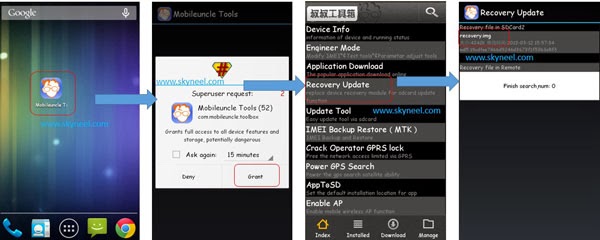

Step 2: Launch Mobile Uncle Tools  >>> You will get a popup tab from SU app for root access permission >>> Now, tap on Grant for SU permission >>> Tap on Recovery Update. You will get lots of options on Mobile Uncle tools app >>> Tap on recovery update option.

CWM-Recovery-Mobile-uncle


Step 3:  You will see your recovery.img file with the location information  of storage on your SD Card >>> Tap on the recovery.img file that it shown >>>  Now, apply it. It will ask to you for reboot or go to recovery mode. Thats all.

Comments

Popular posts from this blog

Operating System notes Unit test for BE CSE 4th SEM (CS 6401)

                       KCG COLLEGE OF TECHNOLOGY (CSE 4C) PLEASE DOWNLOAD OPERATING SYSTEM NOTE FOR BE CSE 4TH SEM.  THIS NOTES ONLY FOR CSE-C not for other. we will get more marks from other section. UNIT -1  UNIT-2 PPT's 1. Operating systems      - Unit 1 -  View  /  Download      - Unit 2 -  View  /  Download     - Notes -  View  /  Download all are PDF files. plz use Adobe Reader to view Document.
dolby digital plus for lava iris x1 * download here   dolby digital plus.zip *flash it from cwm recovery !!! iam not resoponsible for your mobile. take your own risk,

SOLVING BUGS ON PORTING ROM

BUG SOLVING USES HIT AND TRIAL METHOD.I mentioned one or more ways to solve,you try one by one and see which works for you.  FM NOT WORKING:-     COPY THESE FILES FROM STOCK TO PORT:- \system\lib\libaudio.a2dp.default.so \system\lib\libaudio.primary.default.so \system\lib\libaudiocompensationfilter.so \system\lib\libaudiocustparam.so \system\lib\libaudioeffect_jni.so \system\lib\libaudioflinger.so \system\lib\libaudiosetting.so \system\lib\libfmar1000.so \system\lib\libfmcust.so \system\lib\libfmjni.so \system\lib\libfmmt6616.so \system\lib\libfmmt6620.so \system\lib\libfmmt6626.so \system\lib\libfmmt6628.so OR try this system/etc/firmware/mt6620_patch_e3_hdr.bin system/etc/firmware/mt6620_patch_e6_hdr.bin-> If yours is MT6628, you'll need to patch all mt6628_fm_*_*.bin too system/etc/firmware/WMT.CFG-> This is the antenna cfg, without this, FMradio cannot receive clearly system/lib/modules/mtk_fm_drv.ko system/lib/libfmcust.so For WiFi Bluethooth:- ...