Once you have rooted any Android smartphone, the next step is to install a custom recovery so that you can have full android backups which can be restored in case anything goes wrong. For more details on clockworkmod recovery and why you might want to install it on an Android device,
Requiement
*Rooted device
*Mobile uncle tool
Ported recovery
Download Here
Place to SD card(not in any folder)
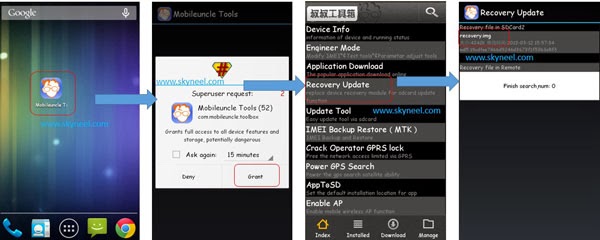
Step 1: open the mobile uncle tool
Step 2: Launch Mobile Uncle Tools >>> You will get a popup tab from SU app for root access permission >>> Now, tap on Grant for SU permission >>> Tap on Recovery Update. You will get lots of options on Mobile Uncle tools app
>>> Tap on recovery update option.
 |
| KARBONN A2+ |
Requiement
*Rooted device
*Mobile uncle tool
Ported recovery
Download Here
Place to SD card(not in any folder)
Step 1: open the mobile uncle tool
Step 2: Launch Mobile Uncle Tools >>> You will get a popup tab from SU app for root access permission >>> Now, tap on Grant for SU permission >>> Tap on Recovery Update. You will get lots of options on Mobile Uncle tools app
>>> Tap on recovery update option.
Step 3: Rename recovery.img then uou will see your recovery.img file with the location information of storage on your SD Card >>> Tap on the recovery.img file that it shown >>> Now, apply it. It will ask to you for reboot or go to recovery mode. Thats all.
Comments
Post a Comment